
Skol Online Casino App
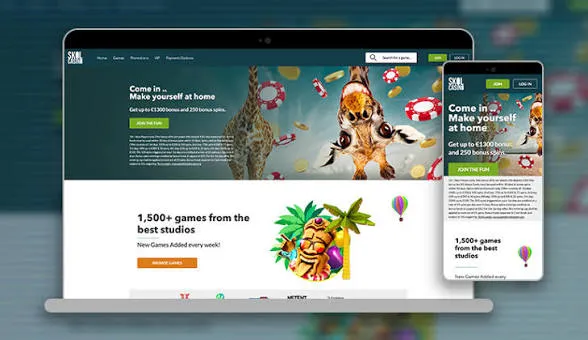

At Skol Casino, we know that most of our players want to spin the reels, chat with a live dealer, or check their balance without sitting at a desktop. That's why we built our mobile app to bring the full Skol experience straight to your phone or tablet. Whether you're commuting, waiting in line, or relaxing on the sofa, our app keeps the casino in your pocket, ready whenever you are.
We've designed the Skol Casino app around speed, simplicity and security, so you can log in, claim your rewards and start playing within seconds. Below, we walk you through everything you need to know about getting started with our app, from installation to banking.
Security and Licensing
We hold licenses from the UK Gambling Commission and the Malta Gaming Authority, and our app inherits the same security standards as our desktop platform. Every transaction is encrypted, and your personal data is protected under strict regulatory guidelines. Customer funds are held at the UKGC's medium protection level, giving you peace of mind whether you're playing on your phone at home or on the move.
Why Players Choose Our App
- No download required - just add our app to your home screen in seconds
- Full access to slots, live tables, jackpots and table games
- Fast, secure banking with multiple deposit and withdrawal options
- Automatic sync between desktop and mobile play
- Our welcome offer of 500+ wager-free spins is available directly through the app
We built the Skol app for players who want flexibility without compromise. Whether you're a fan of classic slots, live dealer action, or chasing progressive jackpots, our mobile platform puts everything within reach.
Getting the Skol App on Your Device
We don't require a separate download from an app store - instead, our app runs as an instant-play progressive web app straight from your browser. This means you get all the benefits of an app - a home screen icon, faster loading, and a smoother interface - without giving up storage space on your phone.
For Android Users
- Open your mobile browser and go to our official Skol Casino website
- Log in or register a new account
- Tap the browser menu and select 'Add to Home Screen'
- Confirm the installation and find the Skol icon on your home screen
- Launch the app anytime for instant access to our games
For iOS Users
- Visit Skol Casino.com using Safari on your iPhone or iPad
- Sign in to your account or create one if you're new to us
- Tap the Share icon at the bottom of the screen
- Select 'Add to Home Screen' and confirm
- Open the app icon whenever you want to play with Skol
Logging In and Getting Started
Once you've installed the Skol Casino app, signing in takes just a few taps. We use secure encryption to protect your login credentials, and our system remembers your session so you don't have to type your password every single time. If you're new to us, Skol Casino registration inside the app is just as fast as it is on desktop - fill in your details, verify your account, and you're ready to make your first deposit.
Our skol login process works identically across devices, so whether you're switching from your laptop to your phone mid-session, your balance, history and preferences stay perfectly in sync.
Gaming Library on Mobile
Our app gives you full access to the same enormous library you'd find on desktop - over 2,500 games in total, including more than 1,000 slots from studios like NetEnt, Pragmatic Play, Play'n GO and Big Time Gaming. Megaways fans will find 108 titles to explore, and if you're chasing bigger wins, we feature 291 jackpot games including Mega Moolah and Jackpot King.
Table game lovers aren't left out either - blackjack, roulette, video poker and scratch cards are all optimised for touchscreen play. We've made sure that every skol slots title loads quickly and looks sharp on smaller screens, so you never feel like you're missing out by playing on mobile instead of desktop.
Live Casino On the Go
One of the features our players love most is the ability to join a live table straight from their phone. Our app streams live dealer games from Evolution, Pragmatic Play Live and Ezugi in real time, letting you enjoy live roulette, live blackjack, speed blackjack, and popular game shows like Crazy Time and Monopoly Live wherever you are. With 97 live tables available, our skol live casino selection rivals what you'd find at a land-based venue - minus the travel.
Banking Options in the App
Managing your funds through the Skol Casino app is just as simple as playing games. We support all the same payment methods you'd use on desktop, so switching devices never disrupts your banking routine.
- Visa and Mastercard for quick skol deposit transactions
- Trustly, PayPal, Skrill and Neteller for flexible funding
- Neteller and Skrill withdrawals processed instantly once approved
- Card and bank wire payouts typically arrive within 3-5 working days
Our minimum deposit is £20 to unlock real-money play and the welcome offer, while a skol withdrawal request starts at just £10. All transactions are processed the next working day once your account passes our verification checks, and we cap payouts at £250,000 per bet or spin, excluding progressive jackpots.
Claiming Your Welcome Bonus via the App
We reward every new GB customer with a generous welcome offer, and yes, you can claim it directly through our mobile app. Here's a quick look at what's on the table:
| Offer Detail | Description |
|---|---|
| Welcome Bonus | 500+ wager-free spins within your first 2 weeks |
| Eligibility | New GB customers aged 18+ |
| Qualifying Deposit | £20 minimum to activate real-money play |
| Validity | 14 days from registration or until 2,000 points earned |
| Wagering | None - spin winnings are paid as cash, immediately withdrawable |
Points build up automatically as you play slots, video poker or roulette with real cash, and every threshold you hit unlocks a fresh batch of spins on titles like Eye of Horus, Legacy of Dead, and Reel Rush. We credit spins the next day and they stay active for 72 hours, so there's no rush - just steady rewards as you play. This is one of the easiest ways to enjoy a Skol Casino bonus without any complicated wagering conditions attached.
Our Customer Support
We know that mobile players sometimes need quick answers, so we've made support easy to reach directly from the app.
- Live Chat: available 24/7 with typical replies in 30-60 seconds
- Email: support@Skol Casino.com, with responses within 24-48 hours
- Help Centre: browse common questions right from your device

Final Thoughts
Our app brings everything we've built at Skol Casino into a lightweight, fast, and secure mobile experience. From claiming your first bonus to spinning your favourite slot or joining a live blackjack table, we've made sure every feature works smoothly on your phone. If you haven't tried playing with us on mobile yet, now's the perfect time to add our app to your home screen and see the difference for yourself.
FAQ
Do I need to download anything to use the Skol app?
No, we don't require a traditional download. Our app runs directly through your mobile browser, and you can add it to your home screen for quick access anytime.
Is the Skol Casino app available for both Android and iOS?
Yes, we support both platforms. Our app is fully optimised for Android devices as well as iPhones and iPads running Safari.
Can I claim my welcome bonus through the app?
Absolutely. We let you register, deposit and claim your 500+ wager-free spins directly from the app, just as you would on desktop.
How do I log in to my account on mobile?
Simply open the app icon on your home screen and enter your usual login details. We keep your session secure with the same encryption used across our platform.
Are withdrawals processed differently through the app?
No, we process all withdrawal requests the same way regardless of device. Neteller and Skrill payouts are instant, while card and bank transfers take 3-5 working days.
Is the app safe to use?
Yes, we operate under licenses from the UK Gambling Commission and the Malta Gaming Authority, and our app follows the same strict security protocols as our desktop site.
Content updated: September 22, 2026